深入解析 airllm:70B / 671B / 2.8T 模型是怎么跑进 4GB 显存的
💬 评论lyogavin/airllm 38K stars,3500 行 Python。meta 空壳 + forward hook 临时驻 GPU + 预取下一层 + per-expert 流式,让 70B/671B/2.8T 模型跑进单卡 4GB 显存,完整保留 transformers 推理路径,新架构当日支持。
airllm: 让 2.8T 的 Kimi K3 跑在 4GB 显存上,这件事到底怎么做到的#
仓库 lyogavin/airllm ↗,38K stars,作者 Gavin Li。读完代码以后最让我吃惊的不是”它能做到 4GB 跑 2.8T”,而是它怎么做到的”看起来这么朴素” —— 920 行的
airllm_base.py加上 870 行的utils.py,没有任何稀奇古怪的 kernel hack,就是老老实实地”在 transformers 的 forward 上挂一对 hook”。下面把我从代码里读出来的核心机制,按”为什么 -> 怎么做 -> 哪些边界 case”重新讲一遍。
0. 先看数字#
README 第一句话:
AirLLM dramatically reduces inference memory usage, letting 70B large language models run on a single 4GB GPU card — without quantization, distillation, or pruning.
没有量化、没有蒸馏、没有剪枝。这一行是整个项目的”反共识”宣言 —— 4GB 跑 70B 不是靠”把模型变小”,而是靠”让任何大小的模型按层流过 GPU”。
完整的 VRAM 表(README 整理):
| 模型 | 规模 | VRAM |
|---|---|---|
| Qwen3 / Mistral / Phi (~8B) | 8B | ~1-2 GB |
| Qwen3-30B / Mixtral (MoE) | 30-47B | ~1-3 GB |
| Qwen3.8-27B (dense VL) | 27B | 3.33 GB |
| Qwen3.8-Flash-Next (MoE + PLE) | ~180B | 5.95 GB |
| Qwen3-235B (MoE) | 235B | ~3 GB |
| Llama 3.x 70B (full precision) | 70B | ~4 GB |
| Llama 3.1 405B | 405B | ~8 GB |
| DeepSeek-V3 | 671B | ~12 GB |
| Kimi K3 | 2.8T | <4 GB |
Kimi K3 那行是最近(2026-07)加进来的:3.72GB 跑 2.8T 满精度,单张 RTX 6000 Ada。2.8T 是当下最大的开源模型,full precision 跑在 4GB 显存上。
下面这张图是论文里那张 timing improvement —— 8bit / 4bit 块量化带来的 ~3x 加速(论文 arxiv 2212.09720 ↗ 提到的 block-wise quantization 路线):
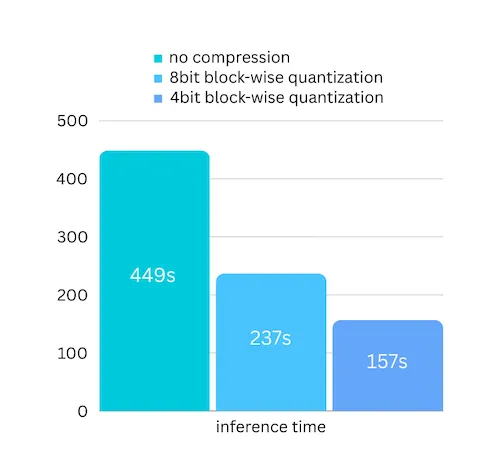
这张图是”顺便告诉你我还能再快 3x”,不是核心机制。核心机制是下面那张。
1. 核心机制: meta 空壳 + forward hook 临时驻 GPU#
整个 airllm_base.py 干了三件事:装壳、装钩、按层换入换出。
1.1 装壳: init_empty_weights 在 meta 上造一个完整模型#
def init_model(self):
    # 关键:   transformers 在 meta device 上实例化
    self.model = self._instantiate_on_meta("sdpa")
    ...

def _instantiate_on_meta(self, attn_implementation):
    with _force_meta_embeddings():
        with init_empty_weights(include_buffers=False):
model = cls.from_config(self.config, **kwargs)init_empty_weights 是 accelerate 提供的工具,它会把所有参数放到 meta device 上 —— meta 是一个虚拟设备,值是 0,形状对,占用的 VRAM 是 0。装出来的模型结构完整(LlamaForCausalLM 完整,每一层都到位),但没有真正的 weight。这就是”空壳”。
为什么要空壳?因为真正的 forward 是 transformers 自己跑的。如果我重新写 forward,就要处理 attention、rotary、KV cache、generation config 等等几十个细节;但只要把空壳装出来,model.generate(...) 就是真正的 transformers 推理,所有新架构(Kimi K3 / Qwen4 / DeepSeek V3)只要 transformers 认识,AirLLM 就免费支持。auto_model.py 里的 ARCH_OVERRIDES 字典只有 11 个 entry,因为绝大多数架构都走通用路径。
但空壳参数是 meta 设备上,不读真数据是空,所以要靠 hook 临时把数据塞进去。
1.2 装钩: 给每个大模块挂 forward pre/post hook#
for idx in self._streamed_indices:
    module = self.layers[idx]
    module._airllm_idx = idx
    module.register_forward_pre_hook(self._pre_hook)
module.register_forward_hook(self._post_hook)_streamed_indices 是所有要流式加载的模块索引,默认包含 embed / 每一层 decoder / norm / lm_head(如果不是 tied embedding)。每个 hook 负责”在这模块 forward 之前/之后做一件事”。
pre_hook:
def _pre_hook(self, module, args):
    idx = module._airllm_idx

    if self.prefetching and self._prefetch_future is not None and self._prefetched_idx == idx:
        # 如果 prefetch worker 已经把这一层放好了,直接拿
        state_dict = self._prefetch_future.result()
        self._prefetch_future = None
    else:
        state_dict = self._load_streamed_layer(idx)

    module._airllm_moved = self.move_layer_to_device(state_dict)

    if self.prefetching:
        nxt = self._next_streamed_idx(idx)
        if nxt is not None:
            # 顺手把下一层丢给后台 worker
            self._prefetch_future = self._executor.submit(self._load_streamed_layer, nxt)
self._prefetched_idx = nxtpost_hook:
def _post_hook(self, module, args, output):
    if (self.hf_quantizer is not None
            or getattr(self, '_expert_streaming', False)
            or getattr(self, '_cpu_resident_params', None)):
        # 有别的 hook 在管,我只搬我刚才搬过来的
        for param_name in getattr(module, '_airllm_moved', []):
            set_module_tensor_to_device(self.model, param_name, 'meta')
    else:
        # 一次性把整个 module 搬回 meta
        module.to('meta')
    clean_memory()
return outputpre-hook 做了三件事:拿当前层到 GPU(或者拿 prefetch worker 已经准备好的)、顺手把下一层丢给后台 worker。post-hook 只做一件事:把这一层从 GPU 搬回 meta。
move_layer_to_device 内部用的是 accelerate.utils.modeling.set_module_tensor_to_device,这是一个会按 parameter name 找子模块、然后把这个子模块的参数切到指定 device 的函数。它不复制,只是”把指针挪到 cuda0”。
1.3 分片: 启动时把每层拆成独立 safetensors#
utils.find_or_create_local_splitted_path 在 from_pretrained 阶段做一次”split”工作 —— 按 model.layers.0 / model.layers.1 / … / model.norm / lm_head 把原 checkpoint 切成 N+2 个独立 safetensors 文件。代价是磁盘占用翻倍(原 checkpoint + 拆分后),但只做一次,之后每一次推理都直接命中这些 shard。
prefetching 默认开。load_layer_to_cpu 读层,如果它的大小 ≤ 2GB(max_pinned_layer_bytes = 2 * 1024^3),会调用 tensor.pin_memory(),让 host->device 走 DMA 加速路径(普通 pageable memory 走的是 staged copy,慢 ~30%)。但 MoE 大模型单层会到 17GB,这种”太大”的层会跳过 pin,直接 pageable。
整个故事用一张图压成 30 秒:
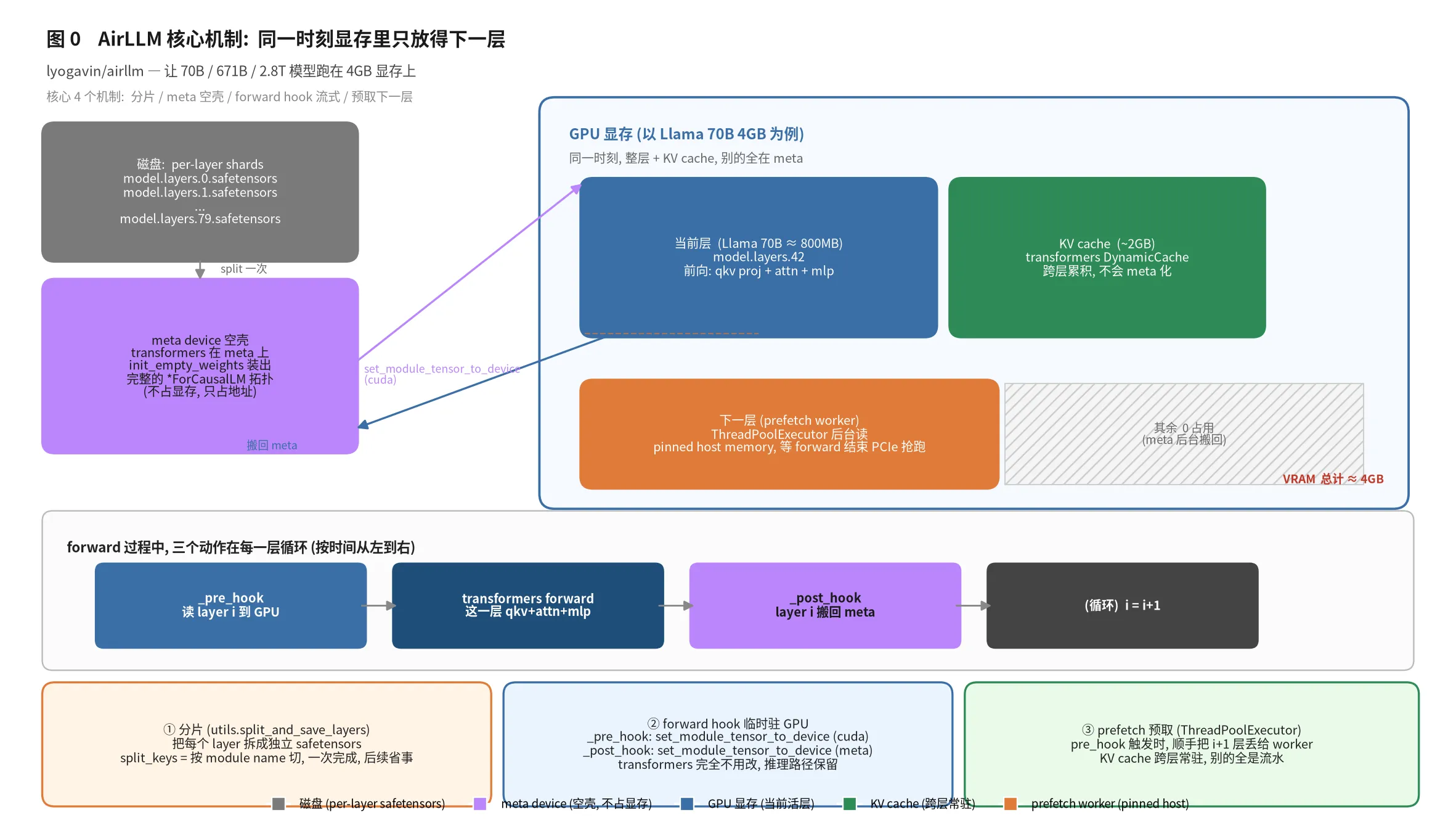
上半部分:磁盘 / meta 空壳 / GPU 三个角色;下半部分:forward 过程中”pre_hook → forward → post_hook → 循环”的时序;底部三块是三个设计点。prefetch worker 的存在是关键 —— 它把 disk->host->cuda 链路上最慢的 disk 段藏到了 GPU 算前一层的时间里。
2. 让 transformers 以为模型本来就在 GPU 上#
这里有个很 trick 的细节,值得拎出来。
2.1 _patch_device_property 改 model.device#
init_empty_weights 装出来的模型,所有的 parameter 都在 meta device 上。所以 self.model.device 会返回 meta。但 transformers 的生成器在很多地方会问 model.device,用来决定把 input tensor 放哪。
def _patch_device_property(self):
    running_device = torch.device(self.running_device)
    running_dtype = self.running_dtype
    base_cls = type(self.model)

    class _AirLLMRuntimeModel(base_cls, *extra_bases):
        @property
        def device(self):
            return running_device
        @property
        def dtype(self):
            return running_dtype

self.model.__class__ = _AirLLMRuntimeModel直接把 model class 换成 wrapper class,@property 让 .device 永远返回 cuda。transformers 问”你住哪儿”,它回答”cuda:0”,然后把 input 也放到 cuda:0 上。但实际算的时候,空壳参数是 meta,真数据是从 hook 临时搬上来的。这层伪装让 model.generate(...) 完全不需要改一行 transformers 代码就能工作。
extra_bases = (GenerationMixin,) 这一段也很重要:transformers >= 4.50 把 GenerationMixin 从 PreTrainedModel 摘了出来,老 remote-code 模型(比如 Kimi K3 的 multimodal wrapper)没继承这个 mixin,model.generate() 就不存在。把它强行 mix 回去,老模型也能调 generate。
2.2 _propagate_attn_implementation 改 sub-config#
def _propagate_attn_implementation(self, impl):
    def walk(cfg, depth=0):
        if depth > 2:
            return
        for sub in vars(cfg).values():
            if isinstance(sub, PretrainedConfig):
                sub._attn_implementation = impl
                walk(sub, depth + 1)
walk(self.config)这是个微妙的多模态 bug:transformers 记录的 attn implementation 只在顶层 config 上,子 config(text_config / vision_config)是空的。Kimi K3 的 decoder 在 language_model 下,它读不到 _attn_implementation,会默认走 flash-attention,而你没装 flash-attn 就会炸。手动遍历两层把所有 sub-config 一起改了,这个 bug 才算按住。
3. 边界 case 1: tied embedding#
有些模型把 input embedding 和 output lm_head 共享一份权重(tie_word_embeddings=True)。这时候 checkpoint 里只有一份权重,不需要独立 shard:
self.tie_word_embeddings = bool(getattr(self.config, "tie_word_embeddings", False))

if self.tie_word_embeddings:
    # 一次加载, 永久 GPU 驻留
    embed_state = self.load_layer_to_cpu(self.layer_names[0])
    self.move_layer_to_device(embed_state)
    self.model.tie_weights()
    self._streamed_indices = list(range(1, n - 1))  # 不再流 embed 和 lm_head
else:
self._streamed_indices = list(range(n))embed 永远驻 GPU 是另一个反直觉的设计 —— 它不大(Llama 70B 是 128K vocab × 8192 hidden × bf16 ≈ 2GB,刚好压在 4GB 边界),但 tied 之后 lm_head 也要它,每次 forward 都要查 embed(Qwen2 系列是这种),不能流。
4. 边界 case 2: per-expert streaming (Kimi K3 这种巨型 MoE)#
这是 AirLLM 最野的一段。Kimi K3 是 2.8T 参数,896 个 expert / 层,每 token 路由到 16 个 expert。一层的 expert 展开后是 ~55GB,一个 token 实际只用到 ~1GB。如果按整层流式,单层 55GB 永远进不了 4GB 显存;如果按 expert 流式,就能用 1GB 装下来。
airllm_kimi_k3.py 在 set_layer_names_dict 里加了一行 expert_prefix = 'block_sparse_moe.experts',然后 _setup_expert_streaming 给每一个 expert module 都挂 hook:
for expert_idx, keys in per_expert.items():
    if expert_idx >= len(experts_container):
        continue
    expert_module = experts_container[expert_idx]
    expert_module._airllm_expert = (idx, expert_idx)
    expert_module.register_forward_pre_hook(self._expert_pre_hook)
expert_module.register_forward_hook(self._expert_post_hook)在 hooks 上再挂 hooks。decoder 层的 pre_hook 仍然在跑(它只加载”非 expert”的参数:router、layer norm、共享 expert 等),但单 expert 的 pre_hook 会在 token 真的被路由到这个 expert 时才触发,只把这一份 expert 权重搬到 GPU。
def _expert_pre_hook(self, module, args):
    layer_idx, expert_idx = module._airllm_expert
    keys = self._expert_keys[layer_idx][expert_idx]
    state_dict = load_layer_subset(self.checkpoint_path, self.layer_names[layer_idx], keys)
module._airllm_moved = self.move_layer_to_device(state_dict)只读需要的 tensor,只搬需要的 expert。这是 read-by-need + load-by-need 的极致组合 —— 一层 896 个 expert,但显存里永远只有被路由的 16 个。
注意这一招对 Qwen4-Exp / Flash-Next 没用 —— Flash-Next 的 expert 是 packed 3D tensor(不是 ModuleList),Kimi 那种”给每个 expert 挂 hook”的路子走不通。所以 airllm_qwen4_exp.py 的注释里很坦诚:
Packed MoE experts are 3D tensors on a single module, not a
ModuleList, so Kimi-style per-expert module hooks do not apply. A whole MoE layer is a few GB of bf16; that is what streams today.
承认边界比硬上更体面。
5. 边界 case 3: Flash-Next 的 51B n-gram embedding 跑哪儿#
Qwen3.8-Flash-Next 是个 125B MoE + 51B PLE n-gram 查表,ngram_embedding.weight 在 bf16 下就是 ~102GB。这个表绝不能上 GPU(单卡装不下),也不能一次性读进 host RAM(64GB 机器读不动)。utils.open_ngram_mmap_table 直接把它 mmap 到磁盘 —— 操作系统 page cache 帮忙,需要哪一行查哪一行,内存峰值就是表大小的零头。
def _load_cpu_resident_modules(self):
    self._cpu_resident_params = set()
    for name in self._cpu_resident_names():
        mmap_meta = Path(self.checkpoint_path) / f"{name}.mmap.json"
        if mmap_meta.exists():
            table = open_ngram_mmap_table(self.checkpoint_path, name)
            self._install_mmap_embedding(name, table)
            self._cpu_resident_params.add(f"{name}.weight")
            print(f"cpu-resident mmap embedding: {name} "
f"{tuple(table.shape)} {table.dtype} (gathered from disk, not copied to RAM)")MmapEmbedding 是个 nn.Embedding 子类,前向时调用 weight[indices],而 weight 是 numpy mmap 数组 —— transformers 的代码本来就 weight[indices].to(device),这个 gather 天然支持 host mmap。
但有个坑:ngram embedding 的 parent 是某个 decoder layer(model.layers.17.ple.ple_embedding.ngram_embedding),那一层 forward 完之后会被 post_hook 搬回 meta。如果直接 module.to('meta'),这个 mmap child 也会被一起 meta 化,下次 forward 就废了。所以 _post_hook 里有这一段:
if (self.hf_quantizer is not None
        or getattr(self, '_expert_streaming', False)
        or getattr(self, '_cpu_resident_params', None)):
    for param_name in getattr(module, '_airllm_moved', []):
        set_module_tensor_to_device(self.model, param_name, 'meta')
else:
module.to('meta')只搬我刚才搬过来的,不碰 mmap child。细节。
6. 边界 case 4: 量化与压缩#
prefetching 和 compression 是互斥的(看 __init__):
if self.compression is not None and self.prefetching:
    print("prefetching is not supported together with compression for now; disabling prefetching.")
self.prefetching = False为什么?压缩要在 load 时 bnb.dequantize_4bit / 8bit 到 bf16,这一步会拿住 GIL,worker 线程没法并行做这件事。所以压缩模式直接关 prefetch,串行干。
压缩用的是 block-wise 量化(参考 arxiv 2212.09720),只量化 weight 不量化 activation。作者的解释很实在:
Quantization normally needs to quantize both weights and activations to really speed things up. Which makes it harder to maintain accuracy…
While in our case the bottleneck is mainly at the disk loading, we only need to make the model loading size smaller. So, we get to only quantize the weights’ part, which is easier to ensure the accuracy.
把瓶颈说清楚:AirLLM 的瓶颈是 disk 读,不是 GPU 算,所以只压 weight 就能把 disk IO 减半 / 减到 1/4。activation 反正不参与 disk,不需要管。
Kimi K3 还用了一种更花的方案:MXFP4 + compressed-tensors。_decompress_state_dict 在 GPU 上做解压(compressor.decompress(local, scheme)),故意不解压到完整 bf16 之前的 state_dict 是 packed payload,只走 4x 少的 PCIe 流量:
# Per the docstring of _decompress_state_dict:
# The expansion happens on the GPU, after transferring the *packed* bytes. For MXFP4 that
# moves 4x less data across PCIe than transferring an already-expanded weight would.更绝的是 compressed-tensors 这个库默认装一个 hook,会在第一次 forward 时把整模型解压。这对 per-expert streaming 是灾难(一个 K3 layer 解压完 ~56GB,4GB 装不下)。所以 init_model 里:
# compressed-tensors registers a hook that expands every packed module on the first
# forward. That undoes per-expert streaming (a K3 layer becomes ~56GB) and is also
# unnecessary: we decompress each expert ourselves as it loads. Remove the hook.
hook = getattr(self.model, "ct_decompress_hook", None)
if hook is not None:
    hook.remove()
delattr(self.model, "ct_decompress_hook")把库的默认行为拆掉,自己接管。这种”我知道库在干什么,我不让它干”是工程上很值钱的能力。
7. Training: 把流式加载也用到 LoRA 上#
2026-09 加进来的 Training 不是简单的”训练时把 adapter 留在 GPU” —— 整个训练 backward 都要按层流。看 airllm_lora.py 里的 _StreamedModule:
class _StreamedModule(torch.autograd.Function):
    @staticmethod
    def forward(ctx, hidden):
        h_cpu = hidden.detach().cpu() if hidden.device.type != "cpu" else hidden.detach()
        with torch.no_grad():
            out = trainer._run_streamed(kind, h_cpu, extras, grad=False)
        ctx.save_for_backward(h_cpu)
        return out

    @staticmethod
    def backward(ctx, grad_output):
        h = ctx.saved_tensors[0].to(trainer.device).detach().requires_grad_(True)
        g = grad_output.to(device=trainer.device, dtype=h.dtype)
        out = trainer._run_streamed(ctx.kind, h, ctx.extras, grad=True)
        if not torch.is_tensor(out):
            out = out[0]
        try:
            out.backward(g)
        finally:
            stream_idx = trainer._stream_idx_for_kind(ctx.kind)
            trainer._evict(stream_idx)
            trainer._prefetch_stream(stream_idx - 1)
        grad_hidden = h.grad if h.grad is not None else torch.zeros_like(h)
return grad_hidden.cpu()关键点:
- forward 和 backward 各自跑一遍前向 —— forward 算
loss,backward 重新跑前向算梯度(经典的 activation recompute) - hidden state 留在 CPU(
h_cpu = hidden.detach().cpu())—— 64 层 hidden 不上 GPU,峰值显存里只有当前层的 hidden + 它的 LoRA 梯度 - Dropout = 0(
lora_dropout=0.0)—— 否则 forward 和 backward 的 mask 不一致 - LoRA A/B + Adam 留在 GPU —— 这是唯一常驻的”可训练”tensor,Qwen3.8-27B 训练时峰值显存 ~2GB(rank 16)
CE loss 也是 chunked(chunked_linear_cross_entropy),免得 logits 一次性上 32K vocab × seq_len 上 GPU。
Qwen3.8-Flash-Next (125B) 训练峰值 <6GB,Qwen3.8-27B 训练峰值 ~2GB。adapter 文件存盘几百 MB。这跟传统 LoRA 训练(全模型 weights + Adam state 上 GPU)根本不是一个量级。
8. 几条值得抄的工程做法#
把 AirLLM 的代码读完之后,我有 4 条”值得抄”的做法:
(1) 用 meta device 装”空壳”模型,然后 forward hook 临时塞数据。这是处理”模型比显存大,但还是要 forward”的通用招式。关键是不重写 forward —— 任何新架构(transformers 认得就行)就免费支持。
(2) 想”看起来在某个 device”,就改 class._patch_device_property 改 model.__class__ 加 @property device,把”模型住哪儿”伪装到 cuda。transformers 问的时候永远拿到真 device,但实际参数在 meta 上。这个套路适合所有”库要 device、要 dtype,你想给一个幻觉”的场景。
(3) 承认边界,不要硬上。Kimi K3 是 per-expert streaming,Qwen4-Exp 是整层 streaming。两个 MoE 模型的 expert 拓扑不一样,per-expert 套路只能用在 ModuleList 上。airllm_qwen4_exp.py 在 docstring 里写清楚”this does not work for me”,并解释为什么,然后改成整层流。这种”工具不通用,我把不通用讲清楚”比”我把所有 case 都装进一个东西”更专业。
(4) 拆掉库的默认行为要写明理由。Kimi K3 那段 ct_decompress_hook.remove() 不是为了 hack 库,是因为per-expert streaming 的设计前提就是”模型不解压”,库的默认 hook 破坏了这个前提。# we decompress each expert ourselves as it loads 这行注释把”为什么拆”写在代码里,后人维护的时候不会误以为”忘了删”。
9. 一些不太行的部分,也要写下来#
工程上不是所有决策都漂亮。提两个我读完觉得”作者也知道但是没法更好”的:
没量化 / 没蒸馏这句话是 PR 话术。 README 写”without quantization”是因为核心是流式,4GB 跑 70B 的关键不是”模型变小”,是”模型在 disk 上”。但 AirLLM 有 compression=‘4bit’ 参数,4bit 量化能再省 4x 加载时间。“不需要量化就能跑”和”不能量化”是两件事。
磁盘翻倍是固定开销。split 之后磁盘占用 ≈ 2x 原 checkpoint(原文件 + 拆分层文件,delete_original=True 才能省)。对一个 360GB 的 Qwen4-Exp / 2.8T 的 Kimi K3,你要么 720GB 磁盘,要么开了 delete_original 之后每次重启都重 split(K3 一次 split 几十分钟)。split 的代码逻辑其实可以做成”在内存里 split,边读边流”避免磁盘翻倍,但作者选择简单直接。
prefetching 在 v2.0 之后因为某些 case 不稳被默认关(从 if not self.prefetching: 这种被默认设成 True 的风格倒推,作者更早的版本是默认 False,后开 True,某些 case 又退回 False)。当一个特性在不同模型 / 不同硬件上行为不稳定,默认开是危险的。如果我用 AirLLM,我会先跑 profiling_mode=True 看 timing,再决定要不要开。
性能:stream 是真慢。Llama 3 8B 在 A100 上 ~30 token/s,AIRLLM 4GB 模式大约 1-2 token/s(取决于磁盘速度);Kimi K3 估计是分钟级 token/s。这是 VRAM 换 latency 的本质 trade-off。生产里如果是大流量,这条路线不实用;但 demo / 个人开发 / 没法弄到 H100 的场景,这是 4GB 显卡玩 70B 的唯一办法。
10. 我的一点观察#
读完以后,我想说几条不那么”工程 review”的观察。
“按层流式”其实是个老想法。2018-2019 年 L2L / Mesh-TensorFlow / GShard 那一票论文里就有”pipeline parallel + activation checkpoint”的影子,本质就是”按层流过去”。AirLLM 的贡献是把这个想法做到了”个人 GPU 也能跑”,而且完整保留了 transformers 的 API。新模型出来当天就支持这个特性,是它和”专门针对某架构重写推理引擎”的路线最大的区别。
Kimi K3 在 4GB 上跑得动 这件事的工程意义 > 工程意义。4GB 显存等于任何一张能插到笔记本 / 边缘设备 / 老服务器的显卡。AirLLM 的客户不是 H100 拥有者,是”我只有 4GB 我能跑 2.8T”的个人开发者 / 学生 / 研究员。这是 LLM 民主化的基础设施层。
用 hook 临时塞数据这个套路,值得在所有”模型比 device 内存大”的场景复用。多模态、Agent、on-device 推理、RAG 召回后用 LLM rerank —— 这些场景里,LLM 是”工具”而不是”主角”,它只需要偶尔被调一次,每次调它不需要把整个模型驻内存。AirLLM 给出的”meta 空壳 + hook 流式 + prefetch”是一个通用 pattern,值得在所有 on-device LLM 工具里复用。
最后,代码质量。920 + 870 + 1000 + 562 行 = 不到 3500 行 Python,覆盖:推理、训练、量化、FP8、MXFP4、per-expert、mmap embedding、tied weights、attention implementation fallback、GenerationMixin mixin、transformers 5.x API 漂移、accelerate 兼容性、bitsandbytes 兼容性、MacOS MLX 分支。这是个”1 人维护、商业模型 5 个月加一档”的项目。我经常看到 LLM 时代的项目要么走”几百文件几万人 LOC”路线(Megatron / DeepSpeed),要么走”几个 hack 文件”路线(vllm 早期);AirLLM 走”中等规模 + 严格边界 + 文档即注释”路线,是值得学习的工程尺度感。
仓库信息
- GitHub: github.com/lyogavin/airllm ↗
- 作者: Gavin Li,Apache 2.0,38K stars
- 核心代码量:
airllm_base.py920 行 +utils.py870 行 +airllm_lora.py562 行 + 各模型子类 < 2000 行 ≈ 3500 行 - 安装:
pip install airllm - 快速上手:
pythonfrom airllm import AutoModel model = AutoModel.from_pretrained("Qwen/Qwen3-32B") out = model.generate(...) - 不需要重新写 forward,新架构(transformers 认得)开箱即用