导语#
最近在学习关于 Go 语言的 Concurrency 的 Channel 模块,在 Ardan Labs 里面看到了一些例子,促进理解 Channel 的一些原理和使用。
一、Channel 的定义#
Channels allow goroutines to communicate with each other through the use of signaling semantics. Channels accomplish this signaling through the use of sending/receiving data or by identifying state changes on individual channels. Don’t architect software with the idea of channels being a queue, focus on signaling and the semantics that simplify the orchestration required.
通道允许 goroutine 通过使用信令语义相互通信。信道通过使用发送/接收数据或识别单个信道上的状态变化来完成该信令。不要以通道是队列的想法来构建软件,而应关注简化所需编排的信令和语义。
二、Channel 的使用方式#
在 Go 中定义一个 chan,即可开启通道模式。
例如:
ch := make(chan int, 1)
ch <- 1
fmt.Println(<-ch)以上的 ch <- 1 就是将数据发送到 channel 中,而 <-ch 就是将数据接收出来。
这样可以实现 channel 管道接收和发送数据。
三、Channel 的一些场景#
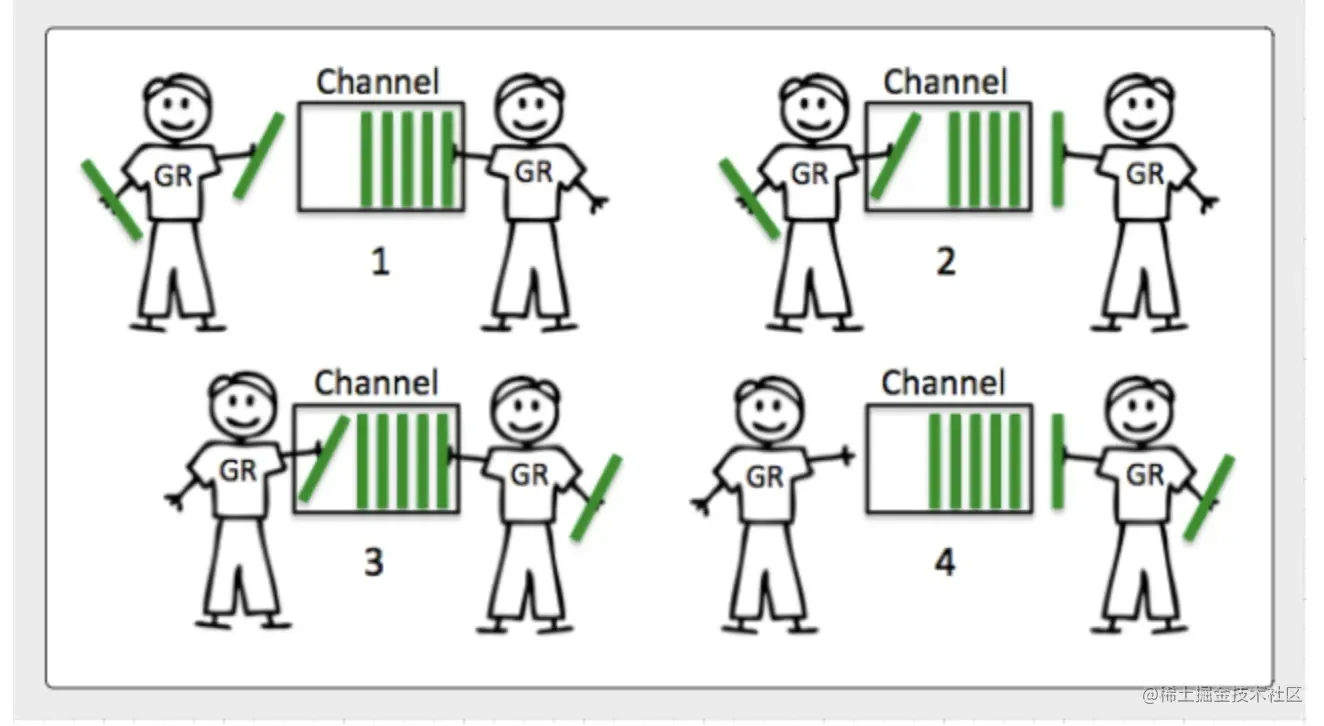
Buffered Channel(阻塞)#
阻塞场景,并发场景,多数据的发送和多用户接收需要从 channel 中慢慢存和取,时间上延时性高,但是实现了高性能高效率传输。
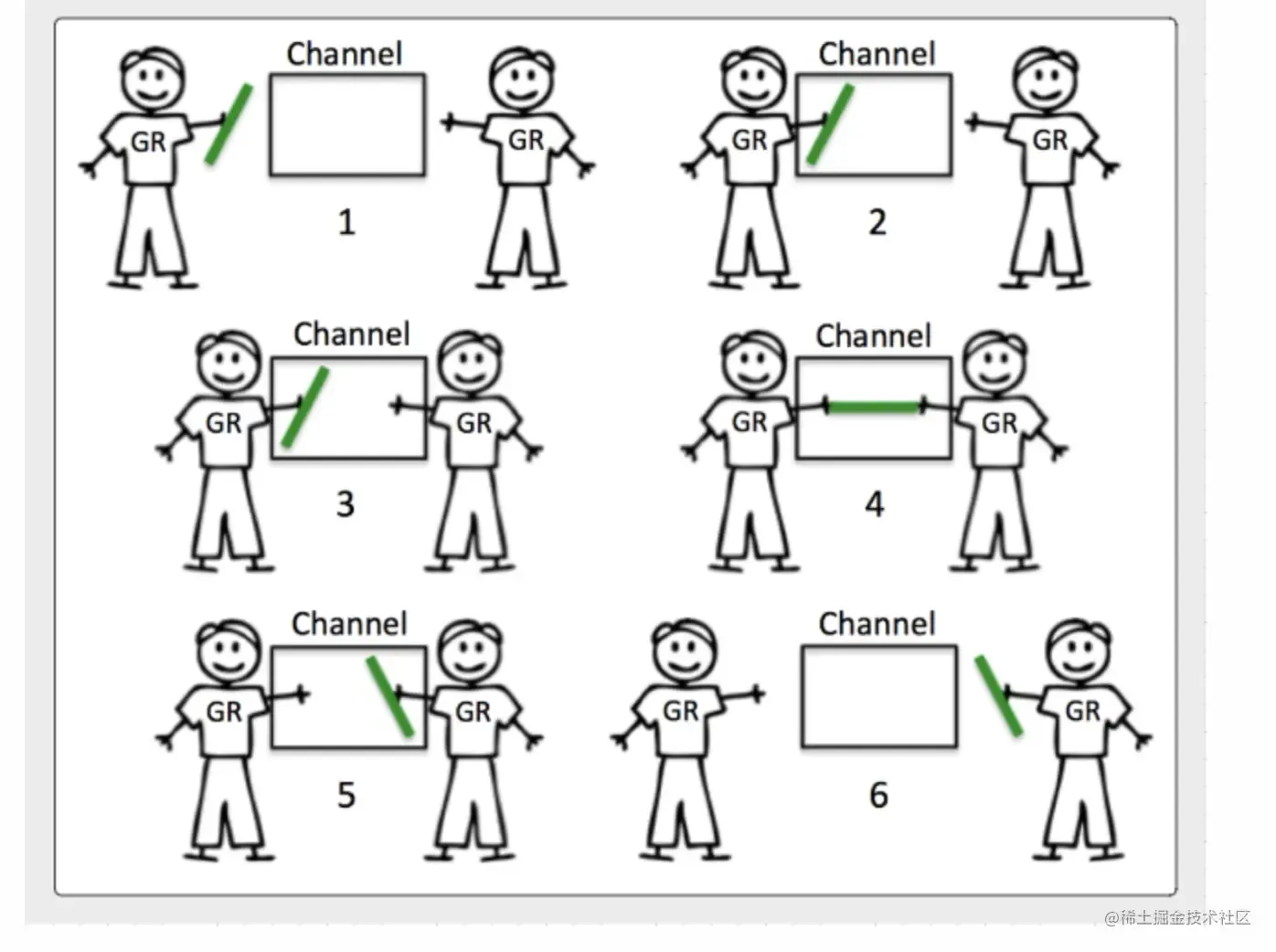
Unbuffered Channel(非阻塞)#
非阻塞场景也是比较常见的,它实现了数据的快速发送和接收,常用于对等单个 goroutine 使用,一对一聊天室?低延时,但需要多个 goroutine 的建立,消耗大量性能。
四、Channel 的简单场景应用#
1. 父 Goroutine 通过 Channel 管道等待子 Goroutine 的数据发送#
// waitForResult: In this pattern, the parent goroutine waits for the child
// goroutine to finish some work to signal the result.
// 父 goroutine 等待信号结果
func waitForResult() {
  ch := make(chan string)

  go func() {
    time.Sleep(time.Duration(rand.Intn(500)) * time.Millisecond)
    ch <- "data"
    fmt.Println("child : sent signal")
  }()

  d := <-ch
  fmt.Println("parent : recv'd signal :", d)

  time.Sleep(time.Second)
  fmt.Println("-------------------------------------------------")
}2. 父 Goroutine 发出 100 份信号,子 Goroutine 池等待信号接收#
// pooling: In this pattern, the parent goroutine signals 100 pieces of work
// to a pool of child goroutines waiting for work to perform.
// 父 goroutine 发出 100 份信号,子 goroutine 池将等待并工作
func pooling() {
  ch := make(chan string)
  // 设置可以执行的最大 CPU 数量,指的是线程
  g := runtime.GOMAXPROCS(0)
  fmt.Println("====", g)
  for c := 0; c < g; c++ {
    go func(child int) {
      fmt.Println("!!!!!1")
      for d := range ch {
        fmt.Printf("child %d : recv'd signal : %s\n", child, d)
      }
      fmt.Printf("child %d : recv'd shutdown signal\n", child)
    }(c)
  }

  const work = 100
  for w := 0; w < work; w++ {
    ch <- "data" + strconv.Itoa(w)
    fmt.Println("parent : sent signal :", w)
  }

  close(ch)
  fmt.Println("parent : sent shutdown signal")

  time.Sleep(time.Second)
  fmt.Println("-------------------------------------------------")
}3. 使用 Channel 管道模拟网球比赛#
// Sample program to show how to use an unbuffered channel to
// simulate a game of tennis between two goroutines.
// 两个 goroutines 之间模拟网球比赛
package main

import (
  "fmt"
  "math/rand"
  "sync"
  "time"
)

func init() {
  rand.Seed(time.Now().UnixNano())
}

func main() {
  // Create an unbuffered channel.
  court := make(chan int)

  // wg is used to manage concurrency.
  var wg sync.WaitGroup
  wg.Add(2)

  // Launch two players.
  go func() {
    player("Serena", court)
    wg.Done()
  }()

  go func() {
    player("Venus", court)
    wg.Done()
  }()

  // Start the set.
  court <- 1

  // Wait for the game to finish.
  wg.Wait()
}

// player simulates a person playing the game of tennis.
func player(name string, court chan int) {
  for {
    // Wait for the ball to be hit back to us.
    ball, wd := <-court
    if !wd {
      // If the channel was closed we won.
      fmt.Printf("Player %s Won\n", name)
      return
    }

    // Pick a random number and see if we miss the ball.
    n := rand.Intn(100)
    if n%13 == 0 {
      fmt.Printf("Player %s Missed\n", name)

      // Close the channel to signal we lost.
      close(court)
      return
    }

    // Display and then increment the hit count by one.
    fmt.Printf("Player %s Hit %d\n", name, ball)
    ball++

    // Hit the ball back to the opposing player.
    court <- ball
  }
}五、Channel 一些禁止项#
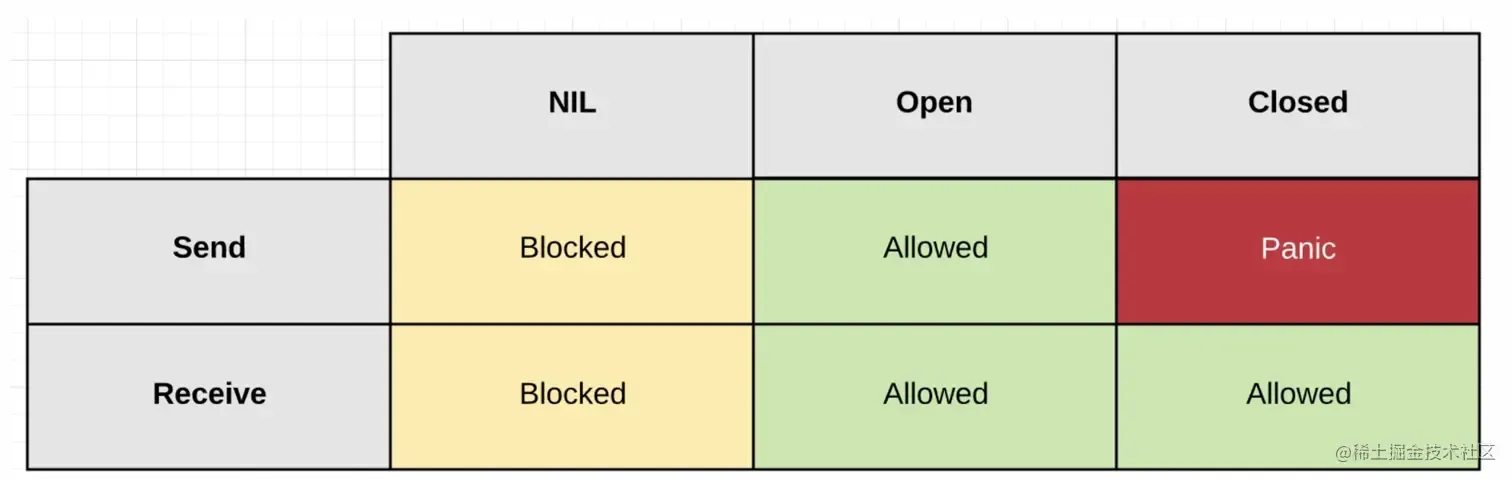
在数据发送和接收这两种方式里,在 channel 管道关闭后,也有一些禁止项。
比如说:
管道 closed 后,不允许再发送数据,如果在发送数据会产生 panic 报错。
ch := make(chan int)
close(ch)
ch <- 1 // panic: send on closed channel总结#
Channel 是 Go 并发编程的核心机制之一,通过信令语义实现 goroutine 之间的安全通信。理解 Channel 的关键点:
- 不要将 Channel 视为队列,而应关注其信令语义
- Buffered Channel 适合高吞吐场景,但有延迟
- Unbuffered Channel 适合低延迟场景,但消耗更多 goroutine
- Channel 关闭后不能发送数据,否则会导致 panic
通过实际场景练习,可以更好地掌握 Channel 的使用技巧。
参考资料:
- Ardan Labs - Go Concurrency
- Go 官方文档 - Effective Go